
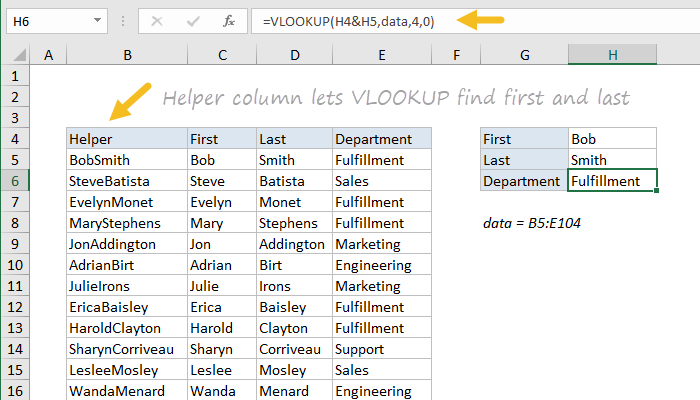
A helper column is a non-technical term to describe a column added to a set of data to help simplify a complex formula or an operation that would be otherwise difficult. The concept is a little abstract, so here are three examples:
-
You can use VLOOKUP to perform a lookup with multiple criteria by adding a helper column to the data. In the example above, a helper column is used to concatenate first and last names, so that VLOOKUP can be used to find departments using both names. Click for details on this formula.
-
You can use a helper column with a formula that returns a value like TRUE for rows that meet specific conditions, then use go to special and delete only those rows. Watch this video to see a “shortcut recipe” to remove specific rows using this technique. The recipe using formulas starts at about 6:00 in the video.
-
You can use a helper column for sorting. For example, you could add values to a helper column to sort a table in ways not easy or possible with the original set of data. You can also use a helper column to preserve and restore the original sort order.