=BITOR(number1, number2)
- number1 - A positive decimal number.
- number2 - A positive decimal number.
Using the BITOR function
The input numbers must be greater than or equal to zero and no larger than 2^48 - 1.


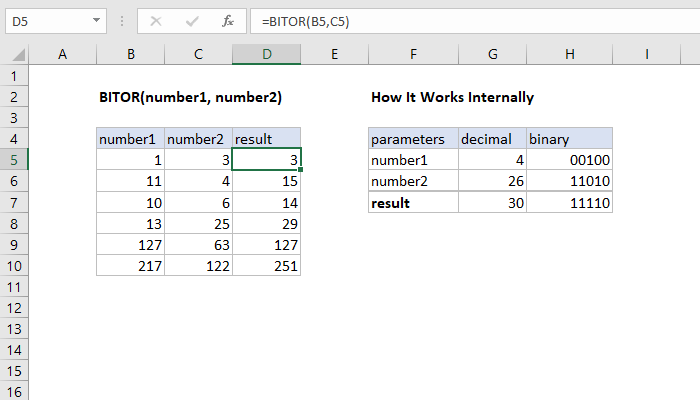
The Excel BITOR function returns a decimal number representing the bitwise OR of two numbers. For each corresponding bit in the binary representation of the numbers a logical OR operation is performed, and the resulting number returned.
=BITOR(number1, number2)
The input numbers must be greater than or equal to zero and no larger than 2^48 - 1.
Author
Hi - I'm Dave Bruns, and I run Exceljet with my wife, Lisa. Our goal is to help you work faster in Excel. We create short videos, and clear examples of formulas, functions, pivot tables, conditional formatting, and charts.
Learn Excel with high quality video training. Our videos are quick, clean, and to the point, so you can learn Excel in less time, and easily review key topics when needed. Each video comes with its own practice worksheet.
View Paid Training & Bundles