=SUMPRODUCT(--ISNUMBER(range))>0Explanation
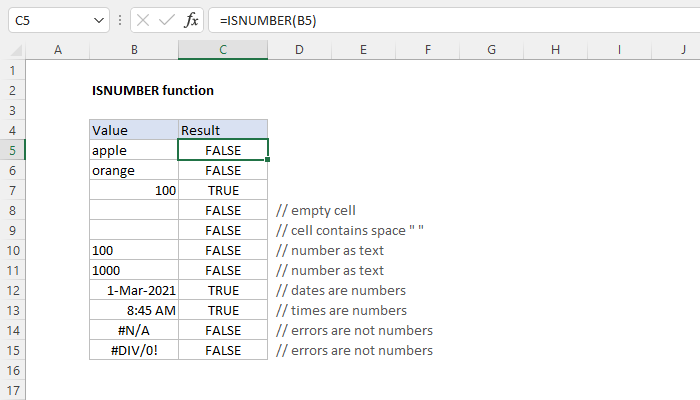
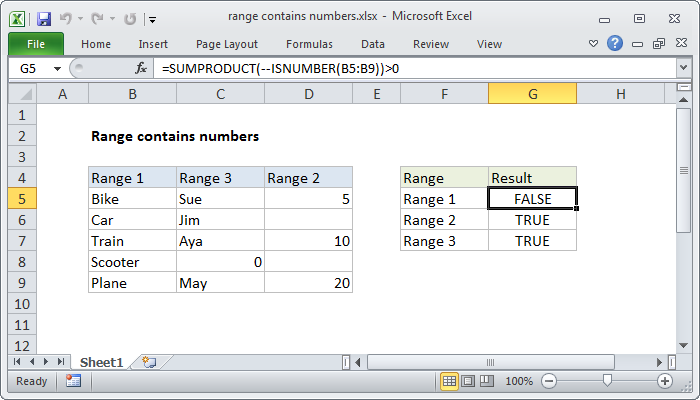
Working from the inside out, the ISNUMBER function will return TRUE when given a number and FALSE if not. When you supply a range to ISNUMBER (i.e. an array), ISNUMBER will return an array of results. In the example, the range C5:C9 contains 5 cells, so the array returned by ISNUMBER contains 5 results:
{FALSE;FALSE;FALSE;TRUE;FALSE}
TRUE values represent numeric values.
We want to know if this result contains any TRUE values, so we use the double negative operator (–) to force the TRUE and FALSE values to 1 and 0 respectively. This is an example of boolean logic, and the result is an array of 1’s and 0’s:
{0;0;0;1;0}
We use the SUMPRODUCT function to sum the array:
=SUMPRODUCT({0;0;0;1;0})
Any sum greater than zero means at least one number exists in the range, so we use “>0” to force a final result of TRUE or FALSE.