
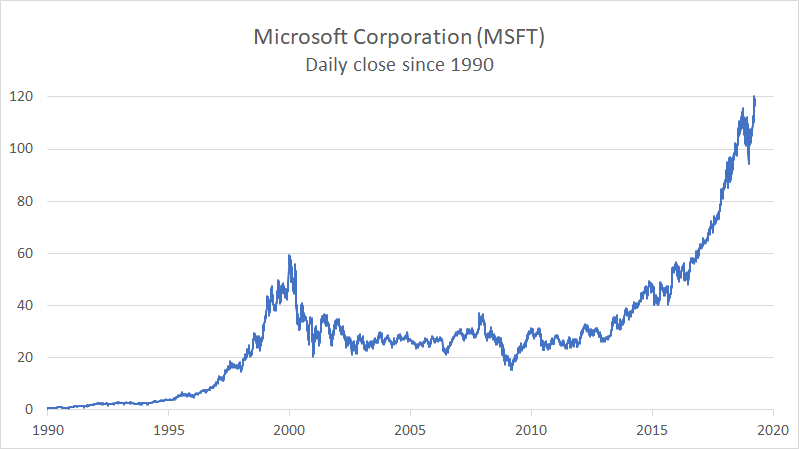
This example shows a line chart plotted with over 8000 data points. The data itself is daily stock market information for Microsoft Corporation over a period of more than 30 years. Only the closing price is plotted. When you first create a line chart with this much data, the x-axis will be crowded with labels. The key is to adjust the bounds and units for the in the Axis options area. In this case, the axis is formatted as a date axis.
Data
Below is a small sample of the data used to plot this chart. This data can be downloaded from Yahoo Finance.

Steps to create
-
Create a Line Chart with Date and Close data only.
-
Remove extra data series, leaving only Date and Close.
-
Make sure x-axis is formatted as a Date axis.
-
Set Major units to 5 years, minor units to 1 year.
-
Set bounds to 1/1/1990 and 1/1/2020.
-
Apply number format to the axis (“yyyy”) in this case.
-
Adjust upper bounds for y-axis as desired.
-
Add a title and apply text formatting as needed